
Working with Aira: proposals, approvals, and undo
Aira never changes data behind your back. Every change arrives as an "Aira proposes" card that spells out what it touches and whether it can be undone — you press the button. Small changes may run immediately, but always with an undo chip riding along.
Prerequisites
- You have met Aira and enabled AI processing (previous tutorial)
- Enough points — a Lite turn costs 1, a Pro turn 5
Read a proposal card
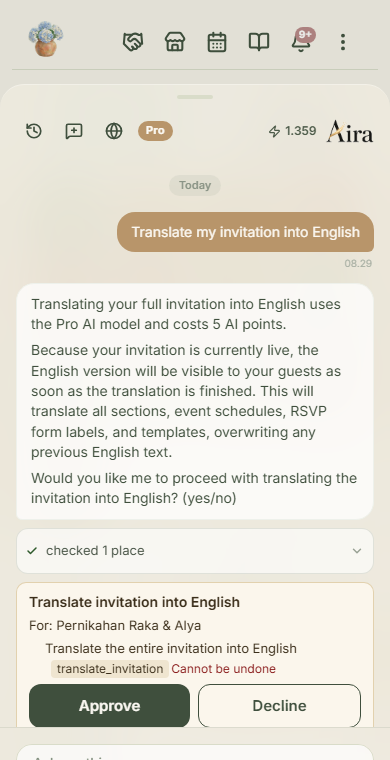
When Aira wants to change something, she sends an "Aira proposes" card marked "Waiting for your approval". The card lists every action: which tool it uses, how many rows it touches ("— affects 12 guests"), and it is honest about consequences — "Undoable for 5 minutes after you approve" or "Cannot be undone". Two buttons wait below: "Approve" and "Decline". Approving applies the change exactly as written; declining changes nothing.
Small changes run immediately, with an undo chip
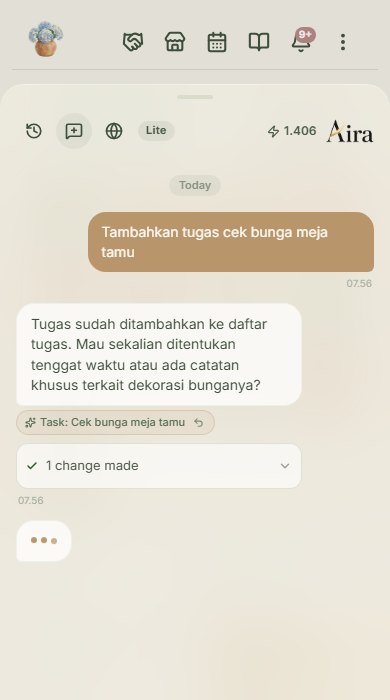
Light commands like "add a task to buy flowers" execute without a card. But under her reply appears an undo chip: tap it before the window closes and the change reverts as if it never happened. The window is 5 minutes for ordinary changes and 20 for work that rewrites many items at once, like shifting most of a run of show. There is no countdown on screen — tap the chip after the window has closed and a notice reads "The undo window has expired"; the change stays locked in.
Dangerous orders always ask first
Deleting data, bulk imports, shifting the run of show, publishing the invitation — all of it always goes through a proposal card, whatever your wording. Tell her "just delete everything" and she still stages it as a card for you to approve; she never upgrades a firm command into a silent action. Questions and reads, on the other hand, never ask.
Recipe: import a guest list
Paste a raw guest list — WhatsApp notes, a spreadsheet dump, any format — and say "here is my guest list, add everyone". Aira answers with a card carrying a preview: how many new guests, how many updated, how many skipped, plus warnings when names look near-identical. Phone numbers and emails land verbatim, never reinterpreted. One import takes up to 300 guests; through the card, you see the numbers before you approve anything.
Recipe: seating and a run of show from notes
For seating, just ask: "move the Halim family to table 5". A full table gets refused with the reason — its capacity and how many seats the party needs — so no table quietly overflows. For the run of show, paste your messy notes and ask Aira to shape them; applying a run-of-show template or shifting many items always passes a confirmation that itemizes the template name and the item count.
Recipe: translate the invitation
Ask "translate my invitation to English" and Aira states the price before doing anything: this job always runs on Pro and costs 5 points per language, on top of the chat turn itself. The new translation overwrites the old one for that language — if your invitation is live, guests see the new version immediately. The confirmation honestly says "Cannot be undone", so read it once more before approving.
Common questions
How long does the undo window last?
Five minutes for ordinary changes, twenty for batch work that touches many items at once. After that the change is locked in as history.
The undo chip is already gone — can I still revert?
Yes, but no longer with one tap. Ask Aira to make the reverse change (she sends a confirmation card too), or edit it manually on the relevant page.
Can Aira delete data without my permission?
No. Commands that delete or bulk-change data always stop at a proposal card awaiting "Approve" — even when you are the one telling her to execute directly.
Why is translating the invitation pricier?
That job always runs on Pro and spends 5 points per language on top of the turn, because the whole invitation is translated in one pass. Aira must state that cost on the card before you approve.
Try Datella free — sign up in under a minute.
Start free