
Buying and using the embed and subdomain add-ons
Beyond plans sit two add-ons bought singly from the "Add one thing at a time" section: the RSVP embed for a personal website, and your own subdomain for the invitation address. Both fit in one sentence: the embed is per event for a year, the subdomain is forever. Setting each up is covered in the embed tutorial and the subdomain tutorial — this page is about buying them and how the credits work.
Prerequisites
- A Datella account and an event with an invitation
- The /upgrade page to buy, or the feature panel itself — the buy button lives in both places
Two add-ons, one way to buy
Open the "Add one thing at a time" section on the Plans & add-ons page. RSVP Embed and 5 Event Subdomains are bought with a "Buy {name}" button just like a plan — no special steps. Your remaining allowance shows there too: "Credits left: {n}" for the subdomain, "Remaining: {n} of {total}" for the rest.
RSVP embed: per event, one year
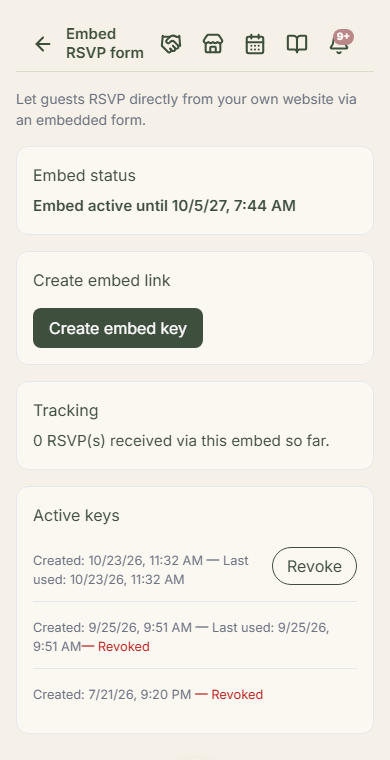
The embed is a paid per-event feature: "Buy once for 1 year." The embed panel in the invitation tools shows its status — "Embed active until {date}" — along with the code snippet to paste on your website and a count of RSVPs arriving through it. After the year, the form on your site turns into a notice ("The RSVP form on this page is no longer active.") and can be renewed.
Subdomain: an account credit, yours forever
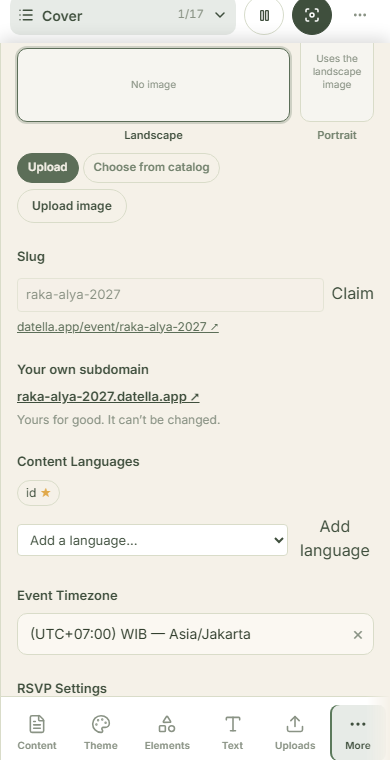
The subdomain works on account-level credits: one credit = one name for one event, and every paid plan already includes one ("Get your own address… it comes with every plan, or on its own"). The thing to understand before picking a name: once claimed it cannot be changed — the name sticks to that invitation for good, no renames, no moving it to another event.
Choose the name carefully before claiming
The name field checks availability as you type: a green "Available", or "That name is already in use" when someone got there first. The rule is "4–30 lowercase letters, numbers or hyphens". Before the claim goes through, a two-line confirmation is honest about it: "{host} will be this invitation's address for good. You can't change it later." — read it once more before pressing "Claim".
When credits run out or the embed expires
Two states you might meet: when all your subdomain credits are spent on other events, the panel reads "Every subdomain you own is already used by another event. Get 5 more to give this one its own." — with a button to the upgrade page. When the embed passes its year, the form embedded on your site becomes the inactive notice until renewed; nothing inside Datella is affected.
Common questions
Can I change the subdomain name after claiming?
No. The name sticks to that event for good — no renames, no transfers. If you change your mind, the only path is claiming a new name with another credit, for an event that does not have one yet.
Does one embed cover two invitations?
No. The embed is bought per event and lasts one year for that invitation. A second invitation that also wants a form on a website needs its own embed.
Does my subdomain die when my plan lapses?
No. The subdomain has no expiry — as long as your account holds it (every paid plan includes one), the address stays live. The one-year term applies to capacity like RSVP entries and planning items, not the subdomain.
How much does it cost?
The full price list lives at /pricing and on the buy buttons themselves — this page deliberately does not copy the numbers so it cannot go stale when they change.
Try Datella free — sign up in under a minute.
Start free